Real estate lead management that never lets an enquiry go cold
Leads arrive from a dozen places — portals, Facebook forms, Google ads, your website, walk-ins, referrals. Realease pulls them into one list the moment they come in, checks for duplicates, and hands each one to the right person.
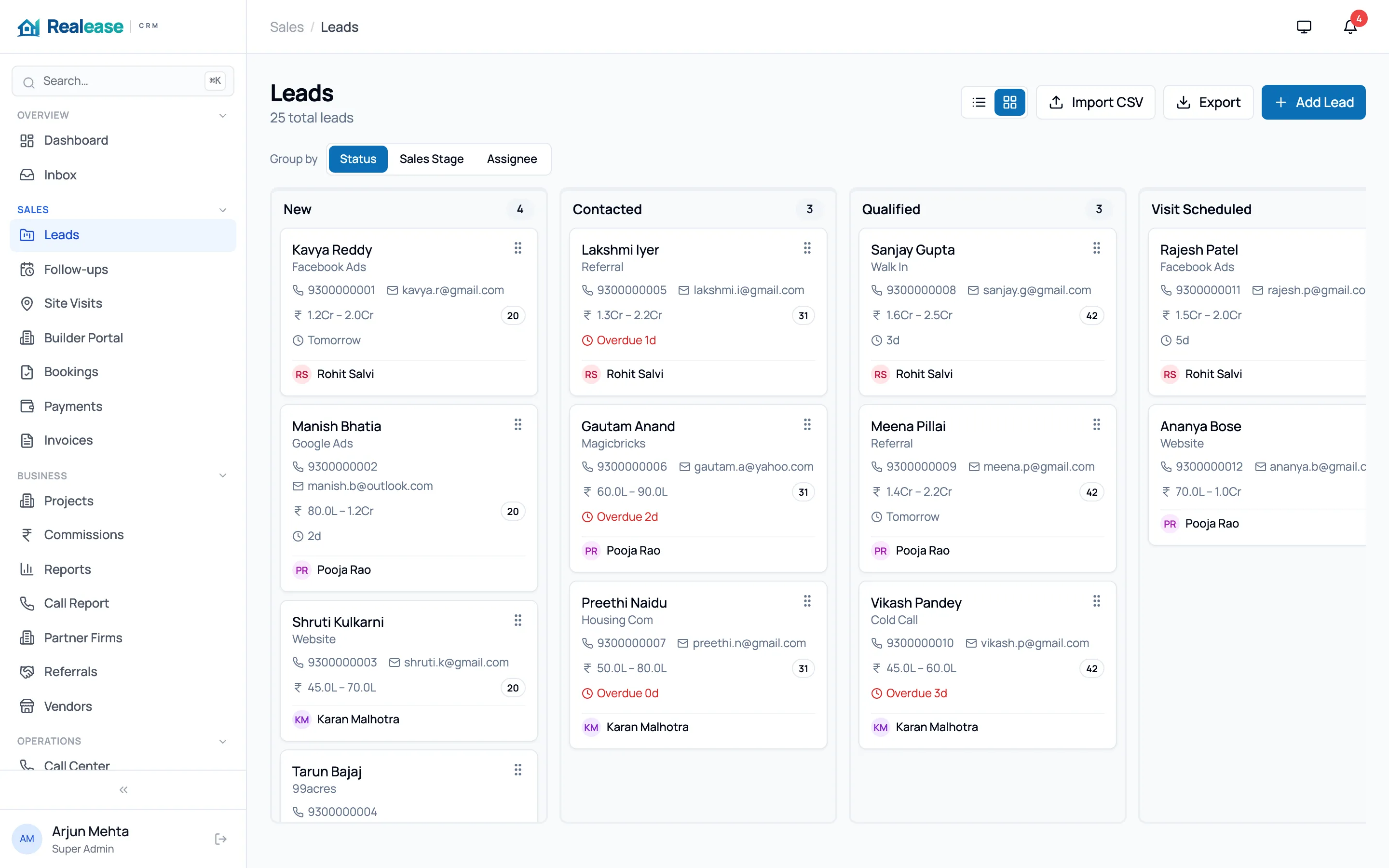
What you get with lead management
Every source, automatically
99acres, MagicBricks, Housing.com, NoBroker, JustDial, Meta Lead Ads, Google Ads, Google Sheets and website forms push leads straight in. No more downloading CSVs every morning.
Duplicates caught by phone number
The same buyer enquiring on three portals shows up once, with every source recorded — so two agents never call the same person.
Smart assignment and routing
Route leads by project, source, budget or location, round-robin across the team, and respect each agent’s capacity. Unattended leads are flagged against your SLA.
Status master that fits your process
Define your own stages — New, Contacted, Visit scheduled, Negotiation, Booked — and see time-in-stage and SLA breaches at a glance.
Filters and saved views
Slice leads by project, budget, source, agent, stage or date and save the view your team checks every morning.
Full timeline on every lead
Calls, WhatsApp messages, notes, visits, status changes and assignments in one chronological history — anyone can pick up where a colleague left off.
Which lead sources can Realease capture automatically? +
99acres, MagicBricks, Housing.com, NoBroker, JustDial, Meta (Facebook and Instagram) Lead Ads, Google Ads, Google Sheets and any website form. Walk-ins and referrals can be added from the web app, mobile app or the walk-in kiosk.
How does Realease handle duplicate leads? +
Leads are matched by phone number within your organisation. A repeat enquiry is linked to the existing buyer and flagged as a duplicate, so the original owner keeps the relationship.
Can I import my existing leads from Excel? +
Yes. Upload a CSV or Excel file, map the columns, and Realease imports the leads with duplicate checks. Our team can help with large migrations.
More from Realease
Site visits
Schedule visits, send reminders, check buyers in at the site and capture feedback — so every visit moves the deal forward.
Channel partner management
Give brokers and channel partners their own portal to register leads and visits, with clear ownership and transparent commissions.
Bookings & payments
Manage inventory, record bookings, track payment milestones, send invoices and receipts, and collect online with Razorpay.
Automation & WhatsApp
Nurture sequences, follow-up reminders and WhatsApp messages that run on their own — so no buyer slips through the cracks.
See Realease with your own projects
A 30-minute walkthrough tailored to how your team sells. We’ll show you lead capture from your portals, site visits, partners and bookings.